
Cafe - Live video chat
Live Technologies Co.Communication
4.53.38K Reviews
- Version
- 1.6.156
- Installs
- 10.00M
- Age Rating
- Mature 17+
Screenshots





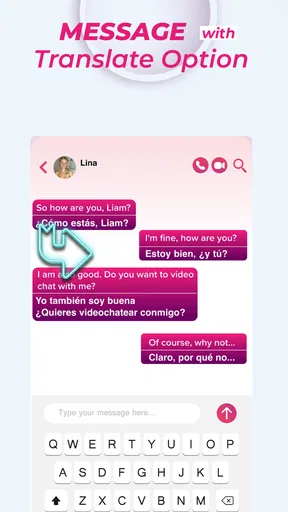
Our Review of Cafe - Live video chat
 Analysis by Appyee
I spent time with Cafe - Live video chat as a communication app, and its appeal is easy to understand: it puts live video at the center of meeting people beyond your usual circle. The experience feels more immediate than text messaging because a conversation depends on faces, timing, expressions, and the small moments that disappear in a typed exchange. That immediacy is also the app’s main challenge. When the connection is weak, the whole experience becomes less comfortable very quickly.
Cafe is free to install, although it includes in-app purchases ranging from $0.99 to $239.99 per item. It is published by Live Technologies Co. and is intended for mature users aged 17 and over. The app has reached more than ten million installs, with an average rating of 4.5 from roughly 130 thousand ratings and about 3.4 thousand written reviews. Those figures suggest that the concept has found a substantial audience, but they do not remove the need to think carefully about how live video fits your own routine.
How Cafe feels when the connection is doing the work
The first thing I noticed is that Cafe is not merely a place to send messages with a camera option attached. Video changes the rhythm of communication. You have to react in real time, pay attention to the other person, and accept that a conversation can feel more spontaneous than a carefully edited chat. That makes the app interesting for people who find ordinary social feeds too passive or text conversations too slow.
A reliable network makes a noticeable difference. On a strong connection, the visual element can make a short exchange feel more personal, especially when you are talking with someone from another country or outside your normal social group. On an unstable connection, however, pauses and image quality problems interrupt the natural flow. A delayed response can look like disinterest, while a frozen image can make it difficult to know whether the other person is still present.
This is why I would not judge Cafe only by how it behaves in a quiet room with excellent Wi-Fi. Its real character appears when you use it in ordinary conditions: moving between rooms, relying on mobile data, or trying to start a conversation while other apps are using the connection. Live video has less tolerance for network trouble than text, so the quality of your experience depends partly on circumstances outside the app itself.
Why live video changes the social experience
Video gives you information that text cannot provide, but that is not always an advantage. Facial expressions can make a friendly exchange warmer, yet they also make the interaction more demanding. I found that I was more conscious of lighting, background noise, and whether I looked ready to be on camera. Someone who wants relaxed, low-effort messaging may prefer a conventional chat service.
The format is most useful when the goal is presence rather than detailed information. If you want to exchange a quick reaction, share a moment, or make a distant conversation feel less formal, Cafe has a clear purpose. If you need to send instructions, organize a group project, search old messages, or keep a precise record of a discussion, a text-first messenger is usually the better tool.
That distinction matters because the app’s store summary emphasizes video chat beyond borders, but the practical value comes from knowing when video is genuinely helpful. I would use it for spontaneous social contact, not as a replacement for every communication method on my phone.
Using it in realistic mobile situations
My preferred way to use Cafe is in a stable, reasonably quiet place with the phone held at a comfortable angle. That sounds obvious, but it changes the experience more than I expected. A steady position keeps the conversation easier to follow, while a noisy or poorly lit setting makes the other person work harder to understand what is happening.
A realistic example would be an evening when I have a few minutes before heading home. I might open the app, connect with someone, and have a short live exchange rather than committing to a long call. In that situation, the app works best when I treat it as a focused social window instead of trying to multitask. Checking notifications, walking through crowded areas, or switching repeatedly between applications can make a live conversation feel fragmented.
I would also avoid using it casually in places where privacy or attention matters. A video chat in public can expose more of your surroundings than you intend, and the camera makes it harder to remain discreet. The mature age rating is another reminder that this is not an app I would hand to a child or recommend for unsupervised younger users.
For mobile users, the key question is not simply whether the phone can run the app. Cafe requires Android 8.0 or later, and the current version is 1.6.156. The more important question is whether your usual mobile routine gives live video enough room to work well. If you often have limited signal, crowded public Wi-Fi, or little privacy, the app may feel less dependable than its basic concept suggests.
What to do when a conversation breaks down
Connectivity problems are not just technical annoyances in a video conversation; they affect trust and timing. If the picture freezes, I first give the connection a moment rather than immediately assuming the other person has ended the exchange. If the problem continues, leaving and trying again from a stronger connection is more sensible than repeatedly speaking into a stalled screen.
A useful habit is to test the environment before starting a longer conversation. I check whether other downloads or streaming activity are competing for bandwidth, move closer to a reliable Wi-Fi point when possible, and make sure the phone is not being used in a position that blocks the camera or microphone. These steps are simple, but they reduce the number of failures that can be mistaken for a problem with the person on the other end.
Recovery also depends on expectations. Cafe is better suited to flexible, informal contact than to an important appointment where a dropped connection would create real consequences. For a serious meeting, a more established conferencing service with stronger scheduling and fallback tools may be preferable. I would not rely on a spontaneous video-chat app as my only channel for something time-sensitive.
The app’s design makes the human side of recovery important too. A short interruption can feel awkward when both people are waiting for the image to return. If you are comfortable restarting a conversation without treating every pause as a failure, the experience becomes less frustrating. That is a small but meaningful trade-off of live communication: it rewards patience, while text lets you continue at your own pace.
Managing mobile data and battery habits
Live video is naturally more demanding than sending text, so I would use Cafe thoughtfully when relying on a mobile plan. I avoid leaving a video session open while doing unrelated tasks, and I prefer shorter, intentional conversations when I am away from Wi-Fi. This is not a criticism unique to Cafe; it is part of choosing video over text. Still, it is easy to forget when the app makes starting a conversation feel effortless.
Battery planning matters for the same reason. A phone that is already low on power is a poor place to begin a long video exchange, especially if you are away from a charger. I found that the best workflow is to decide what I want from the conversation before opening it. A quick check-in, a chance to meet someone new, or a brief social exchange makes more sense than keeping the camera active without a clear purpose.
I also recommend treating the free entry point and the purchase system separately. You can begin without paying, but optional purchases can become significant because the listed range extends from small amounts to $239.99 per item. I would set a personal spending limit before exploring any paid elements and avoid making purchases simply because a conversation feels exciting in the moment. That is especially important in an app built around spontaneous interaction.
Another practical tip is to pay attention to your surroundings before turning on video. A neutral background, headphones when appropriate, and a location where you can end the conversation comfortably all improve control. These choices do not add features to Cafe, but they make the existing video format easier to manage and reduce the chance of sharing more than intended.
Who will enjoy Cafe, and who should choose something else
I think Cafe is a good fit for adults who want communication to feel visual and immediate. It may appeal to someone curious about meeting people beyond familiar borders, particularly if that person enjoys spontaneous exchanges and is comfortable adapting to live conversation. The app also makes sense for users who find text-only services emotionally flat and want more visible human presence.
It is less suitable for people who want careful control over every interaction, extensive written organization, or a communication history that is easy to search and revisit. It is also not my first recommendation for users with unreliable connectivity. A text messenger will usually be more forgiving in those conditions because messages can wait, resend, and be read without requiring both sides to remain connected at the same moment.
Users who dislike appearing on camera should think twice before installing it. The central experience is not a minor extra; video is what gives the service its identity. Likewise, anyone seeking a formal work tool would probably be better served by an app designed around meetings, calendars, documents, and dependable group coordination rather than open-ended social video.
Compared with ordinary messaging apps, Cafe feels more direct but less convenient for asynchronous communication. Compared with conventional video-conferencing tools, it feels more oriented toward casual discovery than planned collaboration. That middle ground is its strongest point and its limitation: it can make a brief interaction feel lively, but it is not designed to replace every structured communication workflow.
My practical verdict on staying connected
After using Cafe, my view is positive but conditional. The app succeeds when the network is stable, the setting is comfortable, and both people want a live exchange rather than a message they can answer later. In those moments, video gives the conversation a sense of immediacy that text cannot reproduce.
The friction appears when those conditions disappear. Weak signal, background noise, low battery, public surroundings, and unclear spending boundaries can all reduce the enjoyment. None of these concerns makes the app unusable, but they mean I would approach it with a little more preparation than I would bring to a basic messenger.
Live Technologies Co. has built an experience around crossing social distance through video, and the idea works best when you accept that connectivity is part of the experience rather than an invisible technical detail. I would recommend trying the free version to see whether spontaneous video communication suits you, while keeping purchases deliberate and choosing a more conventional service for private, formal, or highly organized conversations.
In the end, Cafe is worth considering if you want your conversations to feel present and visual. I would install it for casual international contact and short social moments, not because it replaces every other communication app, but because it offers a different kind of connection. My main advice is to use it when you have a dependable network, enough privacy, and a clear reason to turn the camera on.
Verdict
Strengths of Cafe - Live video chat
- Simple interface makes it easy to start live video chats quickly.
- Supports spontaneous conversations with people from different backgrounds.
- Live format can feel more engaging than text-based messaging.
- Useful for practicing communication and meeting new people.
- Quick access to active conversations without lengthy setup.
Limitations of Cafe - Live video chat
- Public video interactions may expose users to inappropriate behavior.
- Some features or interactions may require in-app purchases.
- Connection quality depends heavily on your internet speed.
- Finding meaningful conversations can be inconsistent.
- Users should review privacy settings before sharing personal details.
Similar Picks in This Category
View All
Google Messages
Google LLC4.6

Gmail
Google LLC4.1

Google Meet
Google LLC4.4

Google Chrome
Google LLC4.1

WhatsApp Messenger
WhatsApp LLC4.6

Carrier Services
Google LLC4.2
Frequently Asked Questions
What is Cafe - Live video chat, and how does it work?
Cafe - Live video chat is a social communication app designed for meeting people through live video conversations. After creating a profile, users can browse available participants, start video chats, and interact through features such as messaging or virtual reactions, depending on the current app version. The experience is focused on spontaneous conversations, so the people you meet and the quality of interactions can vary considerably.
Is Cafe - Live video chat free to download and use?
The app may be free to download, but some features can require in-app purchases, credits, subscriptions, or virtual gifts. Basic access may allow you to create a profile and explore the service, while extended video-chat options or premium interactions could be restricted. Before spending money, review the pricing, renewal terms, and purchase settings shown in the app store and inside the application.
Is Cafe - Live video chat safe for meeting strangers online?
As with any live video-chat platform, users should be careful when communicating with people they do not know. Avoid sharing your address, phone number, passwords, financial details, or private images. Use the app’s blocking and reporting tools when necessary, and leave conversations that become uncomfortable. Parents should also consider whether the app is appropriate for younger users and check its age rating.
Does Cafe - Live video chat require an account, camera, and microphone access?
You will generally need to create or connect an account to use the main social features, although the exact sign-in options may differ by device and app version. Video conversations require permission to access your camera and microphone. You can deny these permissions, but doing so may prevent live calls from working. Check the privacy settings on Android or iOS if you want to change access later.
Will Cafe - Live video chat work well on every phone or internet connection?
The app’s performance depends on your device, operating-system version, available storage, and network quality. A stable Wi-Fi or strong mobile-data connection is recommended for smoother video and audio, while weak connectivity may cause delays, blurry images, or dropped calls. Older phones may also experience increased battery use or reduced performance, so keeping the app and operating system updated can help.
